Luvarly

HR software built on Dutch employment law.

Celest keeps personnel files, contracts, leave, sickness absence and appraisals in one place, and keeps track of the deadlines the law sets for each. We host it for you in the EU, or you run it on your own server.

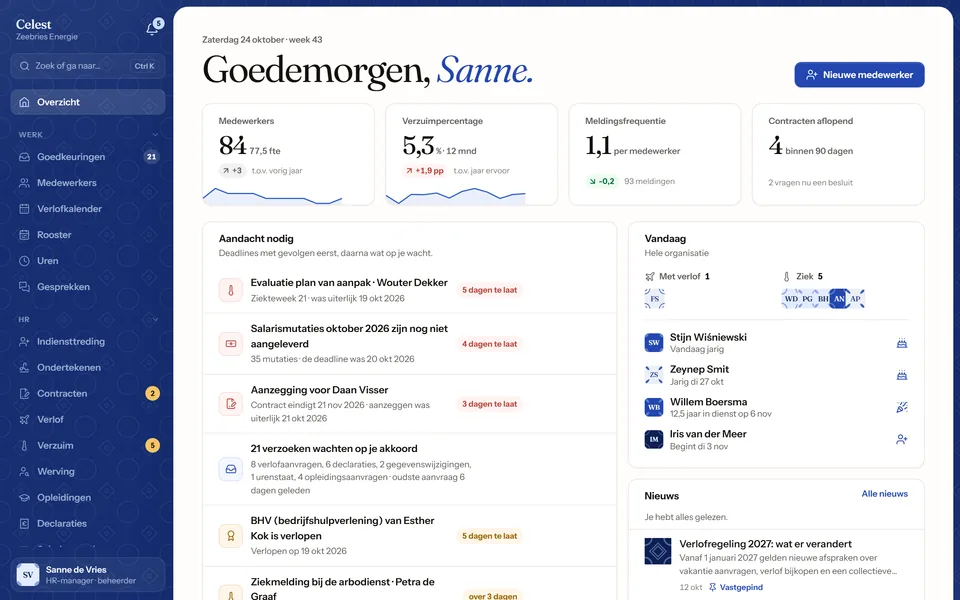
The Celest home screen of an HR manager: headcount, absence rate and contracts ending soon, a list of overdue deadlines such as a Poortwachter evaluation and a notice of non-renewal, and who is away today.
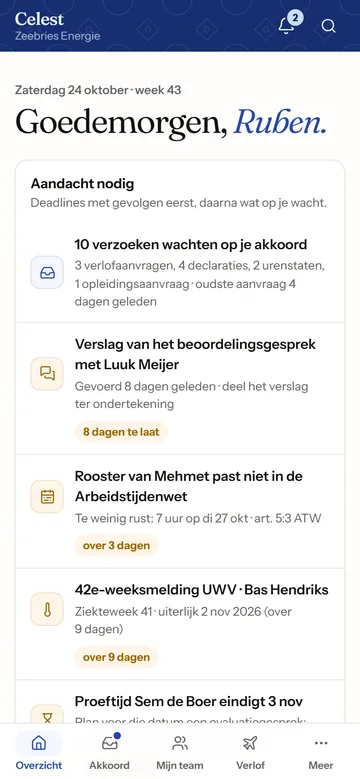
The same Celest on a phone, for a team leader: requests waiting for approval, an appraisal report to share and a roster that breaks the Working Hours Act.
An HR manager's home screen in the demo. Every name in it is made up.

Everything HR, in one place.

Celest is HR software for employers in the Netherlands: personnel files, contracts, leave, sickness absence, appraisals and payroll changes, with the deadlines the law sets for each.

Every re-integration deadline in view.

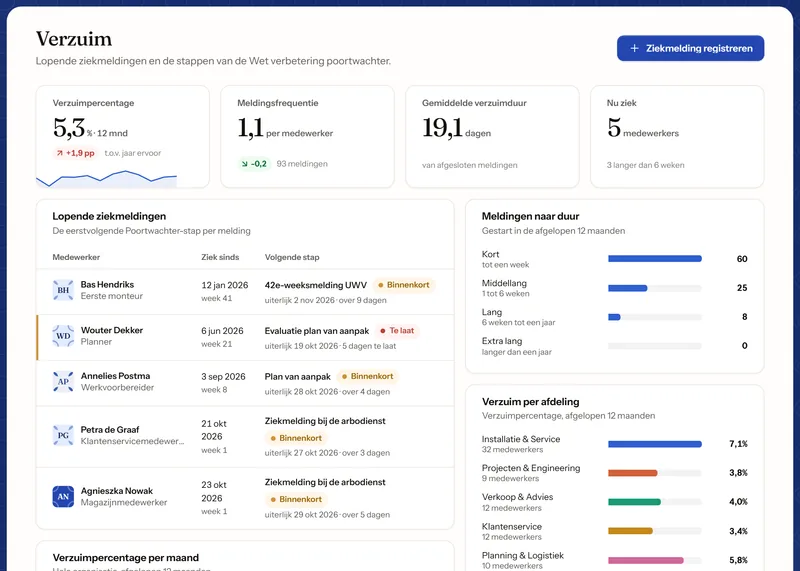
Register a sick report and Celest lays out the Wet verbetering poortwachter for that case: the report to the occupational health service in week 1, the problem analysis in week 6, the plan of action in week 8, the 42-week notice to UWV and every evaluation in between. A step that is late goes to the top of the HR home screen.

  • Absence rate, frequency and average duration, per department
  • Sick and recovery reports by the employee or by HR
  • No medical information anywhere: the screens never ask for it
The Verzuim screen in Celest: an absence rate of 5.3%, the frequency and average duration, the open sick reports with each one's next Poortwachter step and deadline, and absence per department.

No missed notice, no surprise permanent contract.

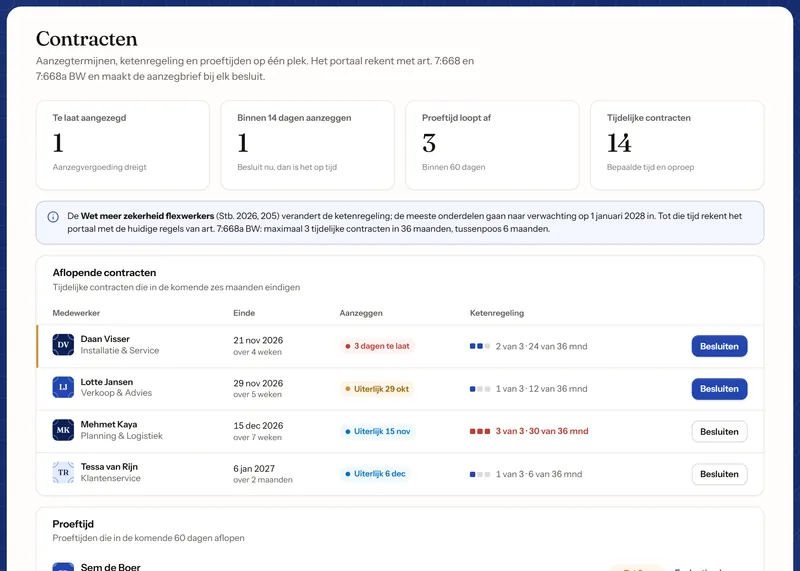
Celest lists every temporary contract that ends in the next six months, with the date by which you must tell the employee whether it continues (the aanzegging) and where it stands in the chain of temporary contracts. You decide to extend, make permanent or end, and Celest drafts the letter.

  • A warning while the notice is still due, before it costs a month's wages
  • Probation periods that end in the next 60 days
  • New contracts signed online in the onboarding module, with the signing evidence kept
The Contracten screen in Celest: one contract past its notice date, one to decide on within 14 days, three probation periods ending, and the expiring contracts with their notice dates and place in the chain of temporary contracts.

Leave, sickness and public holidays on one calendar.

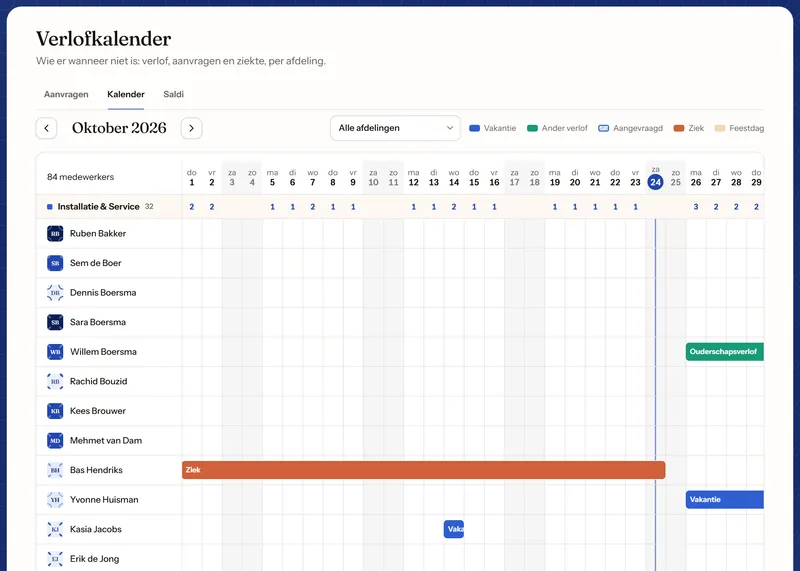
Employees request leave on their phone, their team leader approves it, and the balance updates straight away. The calendar shows who is away in each department, sickness and public holidays included, and every balance keeps statutory and extra-statutory hours apart, each with its own expiry date.

  • Leave in hours, worked out from each person's roster
  • A warning before statutory leave expires
  • Parental, birth and other leave under the Wazo
The leave calendar in Celest for October 2026: one row per employee with holidays, parental leave and sickness as coloured bars, and the number of people away per day in each department.

Everything your payroll provider needs, once a month.

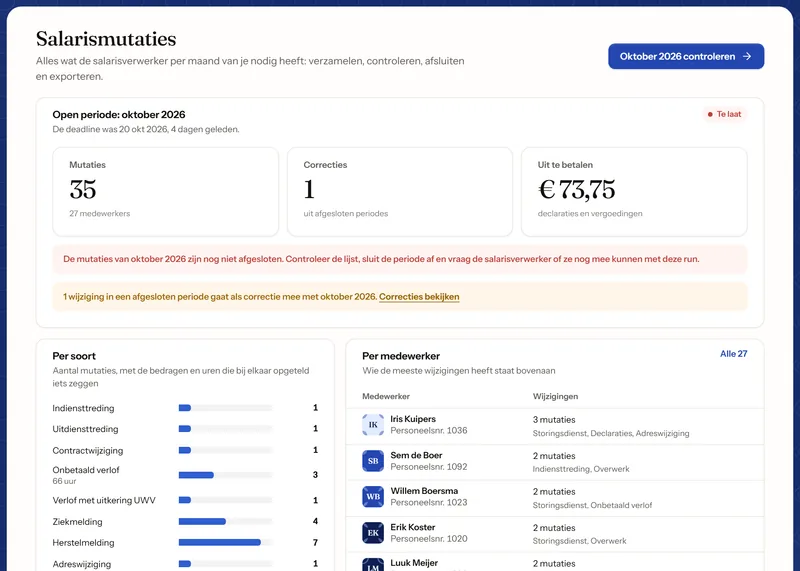
New starters and leavers, contract changes, unpaid leave, expenses, overtime and new bank accounts are collected per month. HR checks the list, closes the period and sends the export to the payroll provider. A change that comes in after closing goes along as a correction the next month.

  • Expense claims with a photo of the receipt, mileage at the untaxed €0.23 per km
  • No full bank account number in any export
  • Celest does not calculate pay: payslips come from your payroll provider and are filed per employee

An optional module

The Salarismutaties screen in Celest: the open October 2026 period with 35 changes for 27 employees, one correction and €73.75 in expenses to pay, broken down by type and by employee.

Employees arrange their own things, on their phone.

Requesting leave, reporting sick and better, logging hours, claiming expenses and preparing an appraisal each take a minute, on a phone or a laptop. The home screen lists what is waiting for them, such as hours to submit or an appraisal to prepare.

  • Payslips, annual statements and contracts in one place
  • Changes to their own details, such as a new address, go to HR for approval
  • Their leave balance, with the hours taken, planned and still available
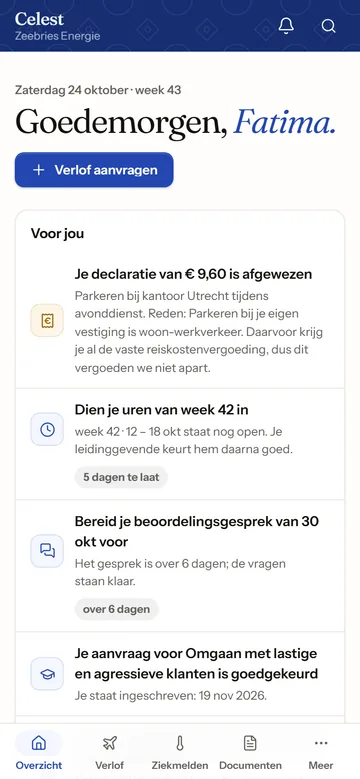
The Celest home screen on a phone for an employee: a rejected expense claim with the reason, hours still to submit, an appraisal to prepare and an approved training course.
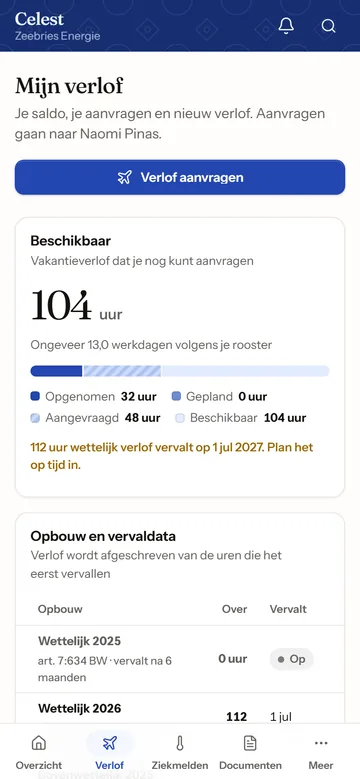
Leave on a phone: 104 hours available, a bar of taken, requested and remaining hours, and a warning that 112 hours of statutory leave expire on 1 July 2027.

One HR system, three kinds of user.

HR, team leaders and employees each see what their work needs. Celest checks every page and every save on the server, so nobody sees more than their role allows.

  • HR and administrators

    Personnel files, contracts, absence, new colleagues, recruitment, payroll changes and reports. Administrators also set leave rules, roles and retention periods.

  • Team leaders

    Their own team: the roster, approving leave, hours and expenses, appraisals and filling a vacancy. They never see a BSN, a bank account or a salary.

  • Employees

    Self-service on a phone or laptop: request leave, report sick and better, log hours, claim expenses, read payslips and update their own details.

Pay for the modules you use.

The core covers what every employer needs. Six modules are optional, and an installation holds only the ones you take: the code for the rest is not in it at all.

In every installation

  • Personnel files

    Personal details, employment, documents, development and history per employee, a wall of faces, and a five-step form for new colleagues.

  • Contracts

    Notice dates, the chain of temporary contracts, probation periods and decisions.

  • Leave

    Requests, approvals, a team calendar with public holidays, and balances per year.

  • Sickness absence

    Sick and recovery reports, the Poortwachter timeline and absence figures.

  • Appraisals

    Appraisal cycles with forms, preparation by both sides, goals and a signed report, and an improvement plan after an insufficient rating.

  • Expenses

    Claims with a receipt, mileage, approval by the team leader and payment through payroll.

  • Reports

    Headcount, FTE, joiners and leavers, length of service, age, absence and expiring leave, and an org chart.

  • Approvals and notifications

    One list of everything waiting for a decision, a notification bell, and email for what matters.

  • Settings and audit log

    Employer details, leave types, roles and retention periods, and a record of every change.

Optional modules

  • Onboarding and digital signing

    A new colleague gets a personal link before day one, fills in their own details and signs the contract online.

  • Payroll changes

    Every change payroll needs, per month: checked, closed and exported.

  • Hours and rosters

    Weekly rosters checked against the Arbeidstijdenwet, hour registration and timesheets approved by the team leader.

  • Recruitment

    Vacancies with a salary range, a candidate pipeline, a scorecard per interviewer and a public application form.

  • Training

    A course catalogue, requests within a yearly budget per person, and a study cost agreement where the law allows one.

  • Company news

    News for everyone or for one department or location, with a read confirmation where needed.

Dutch employment law, built in.

Each rule sits in one place in Celest's code, with its legal basis and its own tests. Amounts that change by law, such as the minimum wage, are reviewed every January and July.

Notice of non-renewal
Tell the employee at least one month before a temporary contract of six months or more ends whether it continues (art. 7:668 BW).
Chain of temporary contracts
At most three temporary contracts in 36 months, and a break of more than six months before the count starts again (art. 7:668a BW).
Wet verbetering poortwachter
The re-integration steps for every sick report and their deadlines, from the report in week 1 to the notice to UWV in week 42 and beyond.
Working Hours Act
Rosters are checked for rest periods, such as 11 hours between two shifts (art. 5:3 Arbeidstijdenwet).
Holiday entitlement
Statutory leave of four times the weekly hours, which expires six months after the year it was earned; extra-statutory leave after five years.
Study cost agreement
Repayment only where the law allows it, never for training the employer must provide (art. 7:611a BW).
Improvement plan
An insufficient appraisal leads to a documented improvement plan, which a dismissal for poor performance requires.
Minimum wage and mileage
The minimum wage, youth wages included, and the untaxed travel allowance of €0.23 per km, at the amounts of October 2026.
Celest helps you keep to these rules; it does not replace advice from an employment lawyer.

Built for the GDPR, which the Dutch call the AVG.

Personnel data is the most sensitive data a company keeps. Celest is built to show less, record every change and forget on time.

  • No medical data

    Absence screens never ask for or show a diagnosis.

  • A masked BSN

    A citizen service number stays hidden until someone reveals it, and every reveal is logged.

  • Every change recorded

    Who changed what and when, with the value before and after.

  • Retention periods

    Each type of document has its own retention period, and a list shows what has passed it.

  • Right of access

    Everything about one employee in a single export, from personal details to hours and appraisals.

  • Applicants forgotten on time

    Applicant data is deleted four weeks after a procedure, or after a year with consent.

  • Safe exports

    Spreadsheet exports never hold a BSN or bank account number, and cannot carry formulas.

  • Nothing left in the browser

    Pages with personal data are never kept in the browser's cache.

Hosted by us, or on your own server.

The same Celest runs in both places, with the same updates.

We host it

We run Celest for you on Cloudflare, with your data stored in the EU. Your team only needs a browser.

  • Updates and backups included
  • A data processing agreement with us
  • Kept running by the people who built it

You host it

Run Celest on your own server or in your own cloud, as a Docker image or on Node.js, with all data in one database file.

  • Nightly backups built in, with optional continuous backup to Azure, S3 or SFTP
  • A build with only the modules you take
  • No outside services needed; sending email is optional

Hosting by Luvarly

From the demo to your own Celest.

A fixed price before anything starts, as with every project we do.

  1. Try the demo

    Click through Celest as HR, a team leader or an employee of a made-up company.

    Try the demo
  2. Request a price

    Tell us how many employees you have, which modules you want and where Celest should run. You get a fixed price within one business day.

    Request a price
  3. We set it up

    Your organisation, departments, roles and leave rules, and your employees brought over from your current HR or payroll system.

  4. Your team starts

    HR, team leaders and employees start using Celest, and we stay on hand for questions and changes.

What Celest costs.

The price depends on three things, and you get it as a fixed quote before anything starts.

Request a price
An example request
EmployeesHow many people Celest manages.
40 people
ModulesThe core, plus the optional modules you take.
Core, payroll changes, hours and rosters
HostingHosted by us, or on your own server.
Hosted by Luvarly
Your price
Fixed, within one business day

Questions, answered.

Is Celest a payroll system?

No. Celest collects every change your payroll provider needs and exports it once a month, but it does not calculate pay. Payslips and annual statements come from your payroll provider and are filed in Celest for each employee.

Does Celest work in English?

The screens are in Dutch, because Celest follows Dutch employment law and uses its terms. This page, the setup and our support are available in English.

Where is our data stored?

If we host Celest, your data is stored in the EU and we sign a data processing agreement with you. If you host it yourself, the data stays on your server; only the backups and email you set up go elsewhere.

Can we run Celest ourselves?

Yes. Celest runs as a Docker image or on Node.js, keeps its data in one database file and makes its own nightly backups. Your build holds only the modules you take; adding one later means a new build.

Can Celest be adapted to our company?

Leave types, days off, departments, roles and retention periods are settings. Anything beyond that, such as a link to your planning software or a report of your own, we build as a fixed-price project.

How does the demo work?

You pick a role and get your own copy of a made-up company of about 85 people. Only you see what you change, and the copy is deleted after 14 days. Try the HR software demo.

Want Celest for your company?

Tell us how many people work for you, which modules you need and where Celest should run. You get a fixed price within one business day.