Try our HR software in a live demo.
Open Celest as an HR manager, a team leader or an employee of Zeebries Energie, a made-up company of about 85 people. No account needed, and you get your own copy: only you see what you change.
Pick who you want to be.
The demo asks this first. Each role opens on its own home screen; this is what to try in each. The screens are in Dutch, so the names of the menu items are given as you will see them.
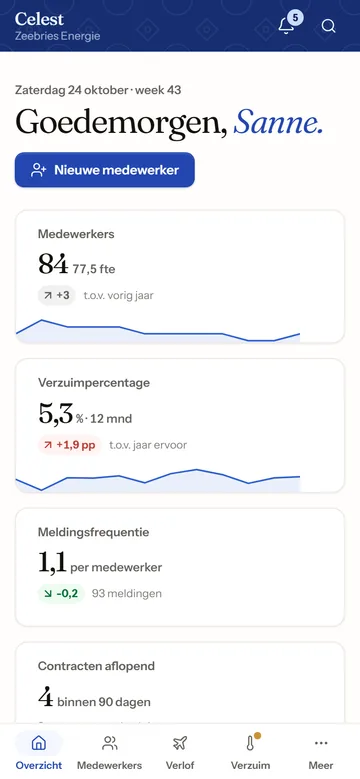
Sanne de Vries
HR manager
Sees the whole organisation, settings included.
Things to try
- Open Verzuim and see the next Poortwachter step for each sick report
- Decide on an expiring contract under Contracten
- Add a colleague with Nieuwe medewerker
- Check this month's Salarismutaties and close the period
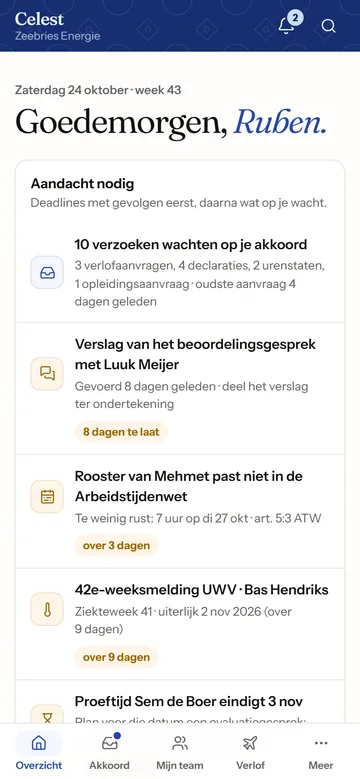
Ruben Bakker
Team leader, installation
Sees only the installation team, without BSN, bank details or salaries.
Things to try
- Approve leave, hours and expenses under Goedkeuringen
- Plan next week in Rooster and see the Working Hours Act check
- Share the report of an appraisal for signing under Gesprekken
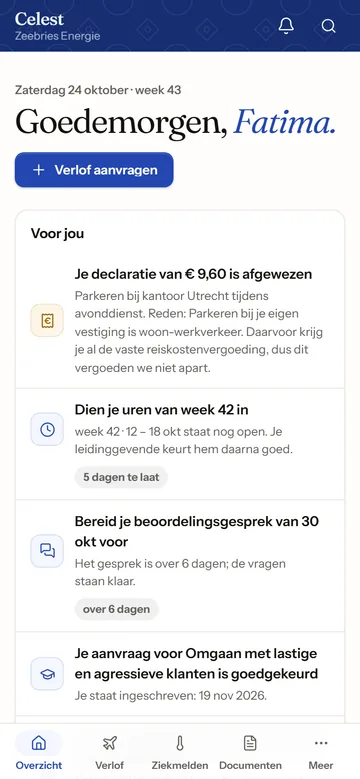
Fatima El Amrani
Customer service
Self-service only: their own leave, hours, documents and expenses.
Things to try
- Request a day off in Mijn verlof and watch the balance change
- Report sick, then better, under Ziek- en betermelden
- Claim an expense with a photo of the receipt
- Prepare an upcoming appraisal
Good to know.
The demo is the real Celest, filled with made-up data.
- A made-up company
- Zeebries Energie and everyone in it are invented. Do not enter real personal data.
- Your own copy
- Every visitor gets a separate copy. Only you see what you change, and it is deleted after 14 days.
- No email goes out
- Messages Celest would send by email land in the Postvak (inbox) inside the demo instead.
- Screens in Dutch
- Celest follows Dutch employment law and uses its terms, so the screens are in Dutch.
- Phone and laptop
- Try both: on a phone, the menu moves to a bar at the bottom of the screen.
Want Celest for your company?
Tell us how many people work for you, which modules you need and where Celest should run. You get a fixed price within one business day.